
🍎
iPhone App
Add Thompson Lotto to your Home Screen — it opens full-screen just like a real app, with push notifications.
v.1.0.4
First open Safari on your iPhone and go to thompsonstrategiesvip.com — use Safari, not Chrome — then follow the steps below.
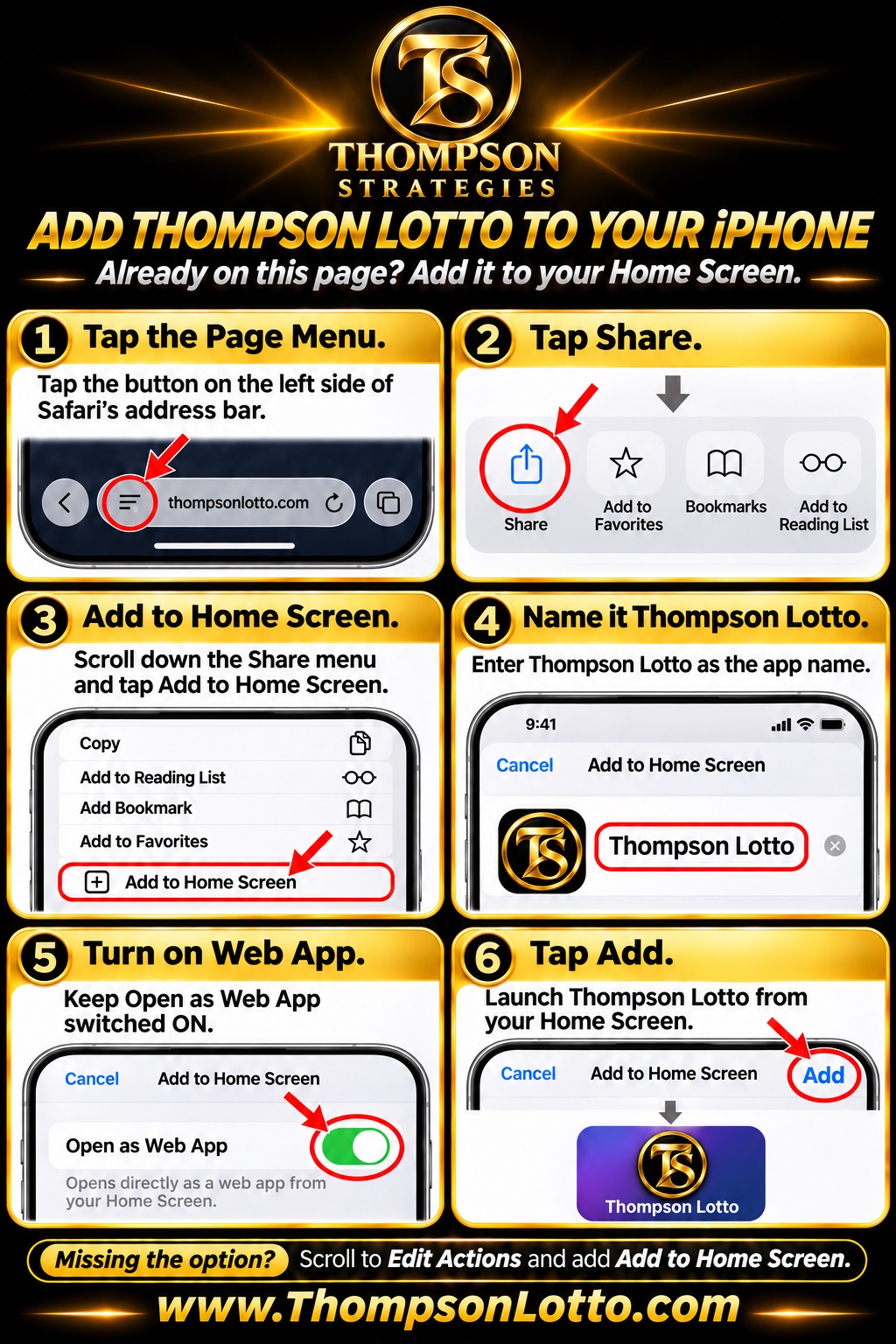
1
☰ Tap the Page Menu
Tap the button on the left side of Safari's address bar.
2
⎙ Tap Share
In the row that opens, tap Share — the square with an arrow pointing up.
3
➕ Add to Home Screen
Scroll down the Share menu and tap Add to Home Screen.
4
✏️ Name it Thompson Lotto
Enter Thompson Lotto as the app name.
5
🔘 Turn on Web App
Keep Open as Web App switched ON — that is what makes it open like a real app.
6
✅ Tap Add
Tap Add, then launch Thompson Lotto from your Home Screen and sign in with your Thompson Strategies email and password.
Missing the option?
Scroll to Edit Actions in the Share menu and add Add to Home Screen.
🔔 Want notifications?
After adding the app to your Home Screen, open it and accept the notification prompt — you'll get alerts for Thompson's picks, messages, and announcements.
Free for all members. Questions? Ask in VIP Chat — we're happy to help.