
🤖
Android App
Add Thompson Lotto to your Android home screen in about a minute — no download needed.
v.1.0.4
First open Chrome on your phone and go to thompsonstrategiesvip.com — use Chrome, not Samsung Internet or other browsers — then follow the steps below.
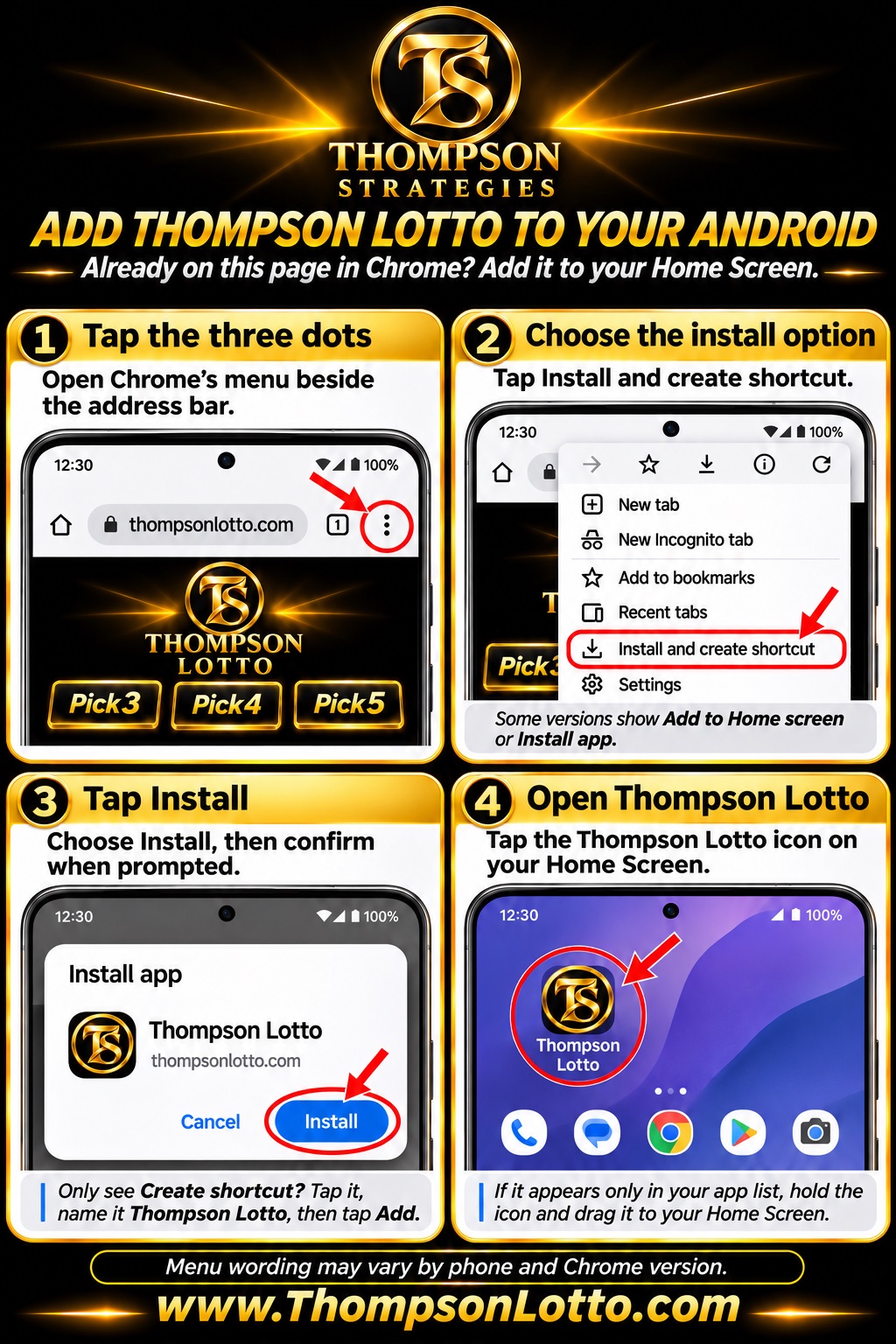
⋮ Tap the three dots
⬇️ Choose the install option
Some versions show Add to Home screen or Install app instead — tap whichever yours shows.
✅ Tap Install
Only see Create shortcut? Tap it, name it Thompson Lotto, then tap Add.
📲 Open Thompson Lotto
If it appears only in your app list, hold the icon and drag it to your Home Screen.
Menu wording may vary by phone and Chrome version. 💡 Having trouble? You can always use the site directly in Chrome — it works the same.
Free for all members. Questions? Ask in VIP Chat — we're happy to help.